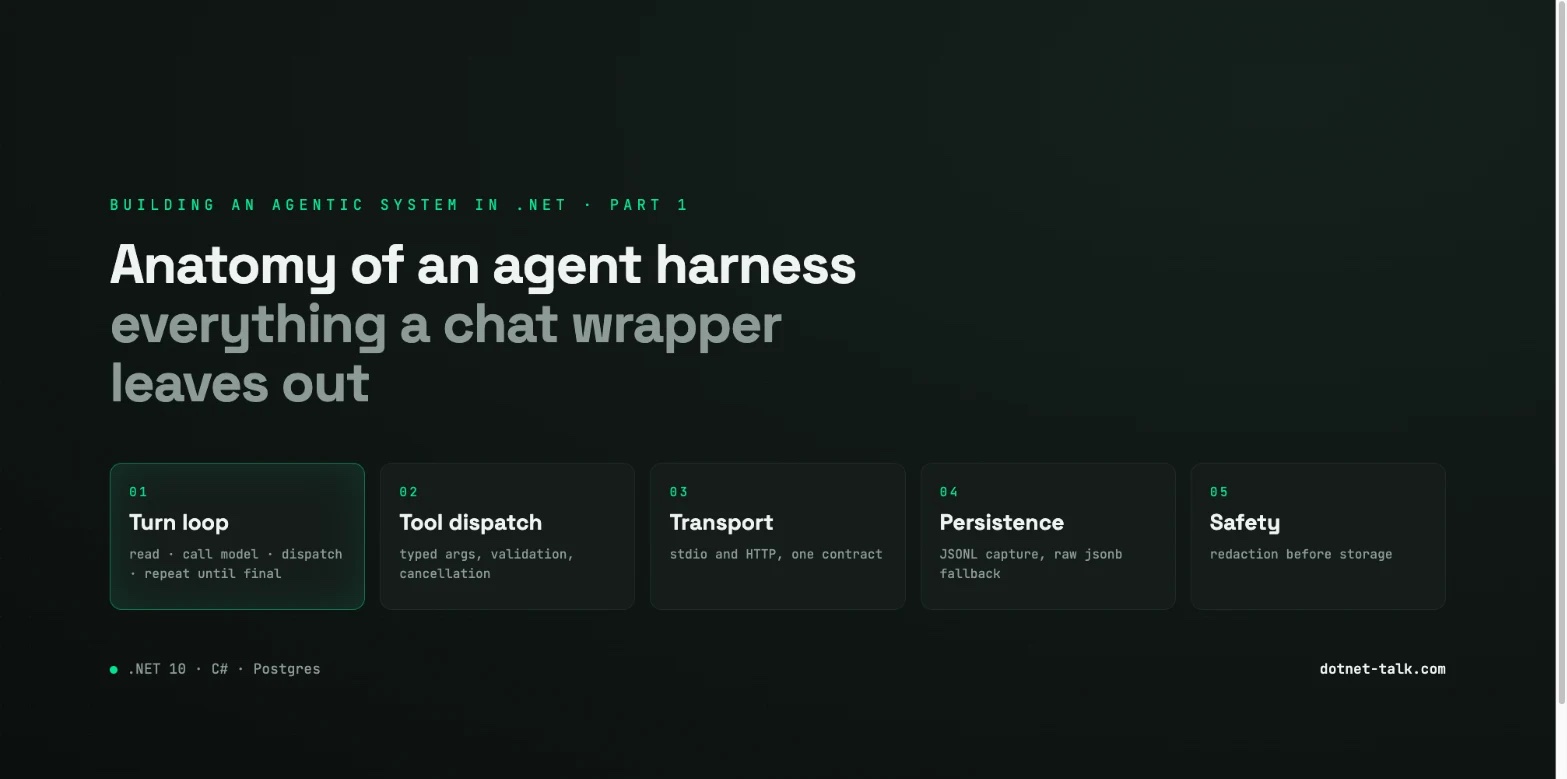
Building an Agentic System in .NET, Part 1: Anatomy of an Agent Harness
A chat wrapper is not an agent harness. This article walks through every structural component a real .NET 10 agent host needs, the turn loop, tool dispatch, persistence and the safety layer, and shows the minimal C# skeleton that survives a crash.
The Gap Between a Chat Wrapper and an Agent Harness
Most "agent" demos are chat wrappers with a nicer UI. Send a message, stream a reply, render Markdown. That works until the process dies in the middle of a tool call, or the MCP server changes its wire format, or you need to replay a session to work out what went wrong. A real agent harness is a different kind of software.
This is Part 1 of a series. We build a production agentic system in .NET 10, piece by piece:
- Part 1, this article. Turn loop, tool dispatch, transport, persistence and the safety layer.
- Part 2. Tool composition with MCP (Model Context Protocol, C# SDK).
- Part 3. Durable memory with Postgres and pgvector.
- Part 4. Keeping that memory true: decay, dedupe, contradiction.
- Part 5. An agent bus in ASP.NET Core: hand offs and delivery guarantees.
- Part 6. Redaction, audit and the safety layer.
Let us be precise about what each piece actually is.
The Five Structural Layers
The Turn Loop
A turn is one unit of work. Read the input, call the model, look at the response, then either return a final answer or dispatch a tool and go round again. The loop is not decoration, it is the thing that makes the model's tool calls actually run. A chat wrapper has no loop, it sends once and receives once. An agent harness keeps going until the model says it is finished, which is usually a finish_reason of stop with no pending tool calls.
Tool Dispatch
The model returns a structured tool call request. Something has to turn that into a function, call it with validated arguments, and feed the result back as a tool role message. In the Microsoft Agent Framework, announced at .NET Conf 2025 and built on Microsoft.Extensions.AI and Semantic Kernel, AIFunctionFactory.Create() does registration and the AIAgent type does dispatch. Remote tools go over MCP, now at v2.0, which implements the 2026-07-28 spec revision and makes HTTP transport stateless by default. That matters. A BackgroundService that assumed a persistent SSE connection to an MCP server has to be redesigned around per request HTTP calls.
Transport
Local tools run in process. Remote tools go over MCP, through the ModelContextProtocol NuGet package, v2.0 stable. The 2026 spec added stateless HTTP, multi round trip requests and caching hints. Down level interop works, so a v2.0 host can negotiate with servers still advertising 2025-11-25 or even the original 2024-11-05. But the tool result envelope is shaped differently in each era, which is exactly why your persistence layer cannot assume a fixed schema.
Persistence
Every turn, the inputs, the model response, the tool calls and the tool results, has to be written to durable storage before the loop moves on. JSONL, one JSON object per line, is the natural format: append only, streamable, easy to tail. The catch is schema drift. The MCP wire format has changed across three protocol versions, so a log from 2025 does not look like a log from 2026. Your reader has to tolerate that.
The Safety Layer
Redaction, rate limiting, output filtering and audit are not add ons. They are seams you design on day one, even if the first implementation just passes everything through. Part 6 goes into this properly.
The Minimal .NET 10 Host
The host is a BackgroundService registered in a minimal API application. The target is .NET 10 (LTS, released November 2025). It ships with JIT improvements that measurably cut tail latency and jitter in minimal API pipelines, which is what you want under an agent host that has to respond predictably.
One thing to know: .WithOpenApi() was removed in .NET 10. Use the built in OpenAPI generator if you need API docs.
The packages:
dotnet add package Microsoft.Extensions.AI
dotnet add package Microsoft.SemanticKernel
dotnet add package Microsoft.Agents.AI.OpenAI --prerelease
dotnet add package ModelContextProtocol
Microsoft.Agents.AI.OpenAI is still --prerelease in mid 2026. Pin an explicit version, never a floating *, and expect SKEXP style diagnostic suppressions in your build output.
The Turn Loop Skeleton
// AgentWorker.cs, runs inside a BackgroundService
public sealed class AgentWorker(
    AIAgent agent,
    ITurnStore store,
    ILogger<AgentWorker> logger) : BackgroundService
{
    protected override async Task ExecuteAsync(CancellationToken ct)
    {
        await foreach (var request in store.ReadPendingAsync(ct))
        {
            var sessionId = request.SessionId;
            var messages  = await store.LoadHistoryAsync(sessionId, ct);

            messages.Add(new ChatMessage(ChatRole.User, request.Content));

            var turn = new TurnRecord
            {
                SessionId  = sessionId,
                TurnId     = Guid.NewGuid(),
                StartedAt  = DateTimeOffset.UtcNow,
                InputJson  = JsonSerializer.Serialize(messages),
            };

            try
            {
                // The agent loop: model call plus tool dispatch until stop
                AgentResponse? response = null;
                while (true)
                {
                    response = await agent.InvokeAsync(messages, ct);
                    messages.AddRange(response.NewMessages);

                    if (response.IsComplete) break;

                    // Tool calls were dispatched internally by AIAgent;
                    // results are already appended to messages.
                    logger.LogDebug("Continuing turn {TurnId} after tool dispatch",
                        turn.TurnId);
                }

                turn.OutputJson  = JsonSerializer.Serialize(response!.NewMessages);
                turn.CompletedAt = DateTimeOffset.UtcNow;
                await store.PersistTurnAsync(turn, ct);
            }
            catch (Exception ex)
            {
                logger.LogError(ex, "Turn {TurnId} failed", turn.TurnId);
                turn.Error = ex.Message;
                await store.PersistTurnAsync(turn, ct);   // persist failure too
                throw;
            }
        }
    }
}
There are a few decisions baked into that:
- Persist before you advance. The turn record is written whether the call worked or failed. On restart,
LoadHistoryAsyncreplays from the last persisted state. ITurnStoreis the seam. The first implementation writes JSONL to disk. Later parts swap it for PostgreSQL with pgvector.AIAgent.InvokeAsynchandles the tool dispatch sub loop for you. You make one call and the framework runs the multi turn tool execution behind it.
Persisting Turns as JSONL
JSONL is the right default. One line per turn, append only, and tail -f gives you real time monitoring for free. Sessions are correlated by writing SessionId on every record.
The hard part is tolerance. A log written when MCP protocolVersion was 2024-11-05 has different tool result envelope fields from one written under 2025-11-25 or 2026-07-28. If your reader calls JsonSerializer.Deserialize<TurnRecord>(line) and throws on an unknown field, it breaks every time the protocol moves.
Parse with JsonDocument instead, pull out what you understand, and keep the raw element in a jsonb column as a fallback. In the flat file version, keep the raw line next to the parsed fields.
Tolerant JSONL Parser
public static class TurnLogReader
{
    public static async IAsyncEnumerable<ParsedTurn> ReadAsync(
        Stream jsonl,
        [EnumeratorCancellation] CancellationToken ct = default)
    {
        using var reader = new StreamReader(jsonl, leaveOpen: true);
        string? line;
        int lineNumber = 0;

        while ((line = await reader.ReadLineAsync(ct)) is not null)
        {
            lineNumber++;
            // Guard against terminal escape sequences prepended to valid JSON
            // (a known noise issue in early stdio/SSE MCP transport logs).
            line = line.TrimStart('\x1b', '[', ';', '0', '1', 'm');
            if (string.IsNullOrWhiteSpace(line)) continue;

            ParsedTurn parsed;
            try
            {
                using var doc = JsonDocument.Parse(line);
                var root = doc.RootElement;

                parsed = new ParsedTurn
                {
                    LineNumber  = lineNumber,
                    RawJson     = line,                          // jsonb fallback
                    SessionId   = TryGetString(root, "sessionId"),
                    TurnId      = TryGetGuid(root, "turnId"),
                    StartedAt   = TryGetDateTimeOffset(root, "startedAt"),
                    CompletedAt = TryGetDateTimeOffset(root, "completedAt"),
                    // Protocol version: handle all three eras
                    ProtocolVersion = TryGetString(root, "protocolVersion"),
                    IsPartial   = false,
                };
            }
            catch (JsonException ex)
            {
                // Malformed line, store raw, mark partial, keep going
                parsed = new ParsedTurn
                {
                    LineNumber      = lineNumber,
                    RawJson         = line,
                    IsPartial       = true,
                    ParseError      = ex.Message,
                };
            }

            yield return parsed;
        }
    }

    private static string?          TryGetString(JsonElement e, string key)
        => e.TryGetProperty(key, out var v) ? v.GetString() : null;

    private static Guid?            TryGetGuid(JsonElement e, string key)
        => e.TryGetProperty(key, out var v) && v.TryGetGuid(out var g) ? g : null;

    private static DateTimeOffset?  TryGetDateTimeOffset(JsonElement e, string key)
        => e.TryGetProperty(key, out var v) &&
           v.TryGetDateTimeOffset(out var d) ? d : null;
}
Two principles are doing the work there:
- Never throw on an unknown field.
TryGetPropertyreturns false for a field that is not there, it does not throw. New protocol fields arrive without a migration. - Keep the raw line.
RawJsonmaps to ajsonbcolumn in PostgreSQL, or a raw string on disk. When you need a field the typed model never anticipated, an"elicitation"block from MCP2026-07-28for example, you can query it out ofjsonbwith no schema change.
The escape sequence strip on read is not theoretical. Early stdio and SSE MCP transports prepended terminal control characters to otherwise valid JSON, which made whole log files look corrupt.
What the Rest of the Series Builds
The skeleton above has four deliberate gaps, interfaces with nothing behind them yet:
| Gap | Filled in | Topic |
|---|---|---|
| Remote tool transport | Part 2 | MCP v2.0, stateless HTTP, multi round trip |
ITurnStore durable backend |
Part 3 | pgvector and Npgsql |
| Cross agent correlation | Part 5 | Message bus, session routing |
| Output safety | Part 6 | Redaction pipeline |
The point is that each capability is a seam, not something bolted on later. The turn loop does not know whether a tool runs in process or over MCP. The store does not know whether the backend is a file or PostgreSQL. That isolation is what makes the system testable and upgradeable.
A Note on Stability
Microsoft.Agents.AI.OpenAI is still prerelease. The MCP SDK v2.0 is stable, but the 2026-07-28 protocol revision is recent enough that the tooling around it is still catching up. Pin every package to an explicit version, run your JSONL reader against logs from all three protocol eras in CI, and treat the jsonb fallback column as load bearing infrastructure rather than a debugging convenience. Everything later in the series is built on top of this.
Sources
- The New Features and Enhancements in .NET 10
- New in .NET 10 and C# 14: Enhancements in APIs Request/Response Pipeline
- .NET
- .NET 10: What You Need to Know (LTS Release, Coming November 2025) | ABP.IO
- ASP.NET Core in .NET 10: Major Updates across Blazor, APIs, and OpenAPI - InfoQ
- .NET 10 - Release · dotnet/core · Discussion #10157
- What's new in .NET 10 | Microsoft Learn
- NET 10 Released: Complete Guide to New Features and ...
Keep reading

October 5, 2026 · 7 min
Building an Agentic System in .NET, Part 6: Redaction, Audit and the Safety Layer
If you archive every agent session, you also archive every secret anyone ever pasted into one. This last part covers the full safety layer: redaction pipelines, audit trails, prompt injection threat modelling and retention pruning, with code.
Read
October 6, 2026 · 6 min
Keeping Your Knowledge Graph Current Without a Dedicated Team
A knowledge graph that nobody updates becomes a lie with good syntax. This article builds the automated maintenance loop — deriving edges from git history, deployment manifests, and OpenTelemetry service maps, reconciling on a schedule, and handling conflicts with provenance on every edge.
Read
October 5, 2026 · 7 min
Building an Agentic System in .NET, Part 5: Designing an Agent Bus in ASP.NET Core
Design a production agent bus in ASP.NET Core 10 with EF Core, SignalR and PostgreSQL, covering agent registration, topic channels, at least once delivery, claim semantics with row level locking, and self contained hand off payloads.
Read